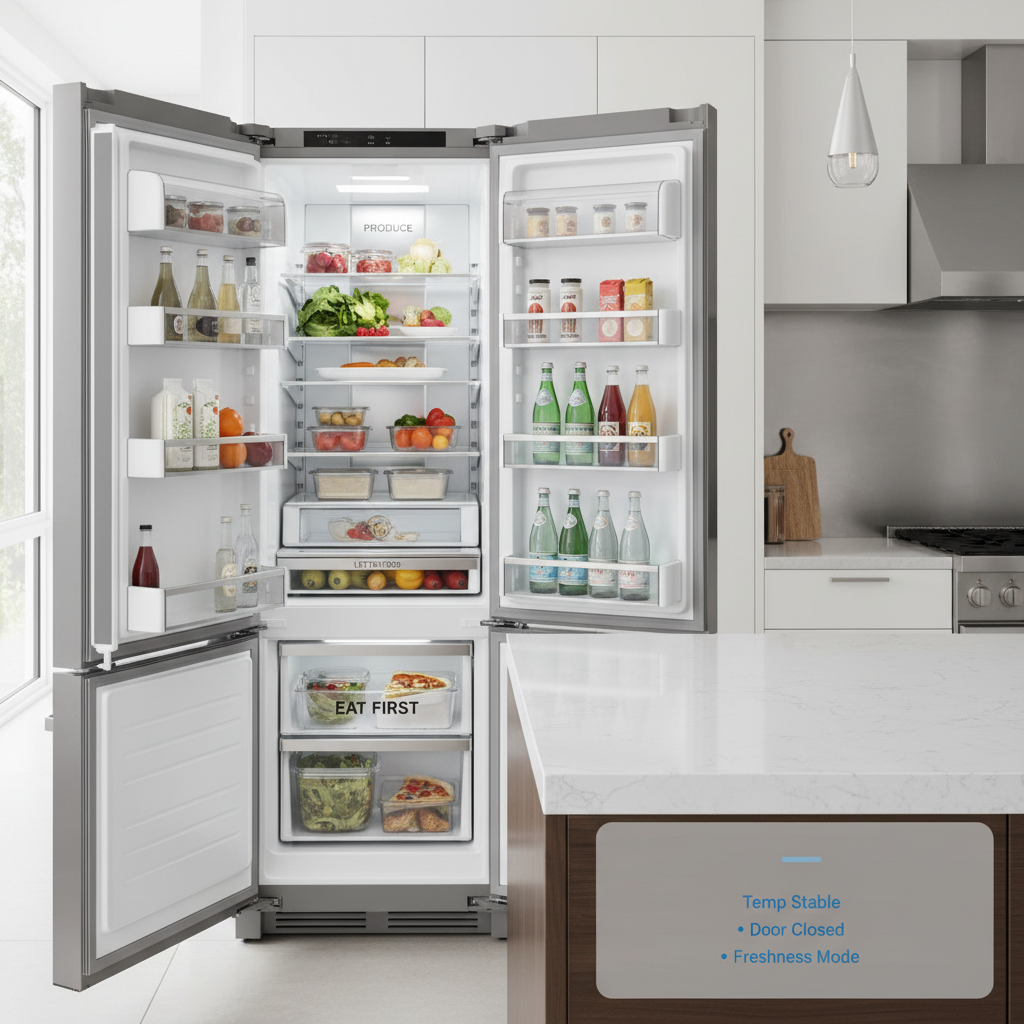
Smart Refrigerators (LG, Samsung, GE): AI Features + Food Waste Tips
Smart refrigerators can absolutely help you waste less food—but not always in the way marketing suggests. Instead of expecting perfect “AI inventory,” the biggest real-world wins usually come from better temperature control, smarter zones, useful alerts, and a simple workflow that helps your household use what you already have. Below, you’ll learn what AI features are legit, what’s still clunky, and how to choose (or supplement) a fridge setup that works well with Alexa + Google Home routines.
Affiliate Disclosure: This page contains affiliate links. If you buy through our links, we may earn a commission at no extra cost to you.
Table of contents
- Smart Refrigerators (LG, Samsung, GE): AI Features + Food Waste Tips
- Freshness tech that actually helps (and what’s mostly hype)
- Zones and temperature features: how to shop smarter
- Camera workflows: what works in real kitchens
- Fridge organization tools
- Alerts, energy, and “quiet AI”: features you’ll actually notice
- Brand overview (LG vs Samsung vs GE): what to expect
- Buying checklist (homeowners vs renters)
- External sensors renters can use instead
- Food waste tips that work with (or without) a smart fridge
- FAQs (Smart Refrigerators + AI + Food Waste)
- Next steps
Freshness tech that actually helps (and what’s mostly hype)
Smart-fridge “AI” tends to be most valuable when it protects freshness through consistent conditions and practical reminders. In other words, the best features are the ones that quietly reduce spoilage without requiring you to scan every item.
Features that often make a noticeable difference 🎯
- Better temperature stability
- Faster recovery after door openings and steadier temps overall.
- As a result, leftovers and produce tend to last longer—especially in busy households.
- Humidity management (crisper drawers / humidity controls)
- Helps leafy greens and produce stay crisp longer.
- Therefore, you’ll see fewer “mystery mushy greens” by day 3–4.
- Door-open and temperature alerts
- Notifications if the door is left open or internal temp rises.
- Consequently, you can prevent spoilage events (especially helpful with kids).
- Filter/maintenance reminders
- Water filter replacement reminders and sometimes diagnostics.
- Plus, it’s one less thing to remember.
Features to treat as “bonus,” not the reason you buy ⚖️
- Perfect grocery inventory tracking
- It’s improving, but still prone to gaps (packaging, occlusions, leftovers, lighting).
- Automatic expiration-date tracking
- Useful if you manually input items; unreliable if you expect it to “just know.”
- Recipe suggestions based on “what’s inside”
- Can be helpful; however, it often depends on the quality of the inventory workflow.
Bottom line: If you want less food waste, prioritize freshness controls + alerts, then layer in habits (and optional sensors) that make it easier to use what you buy.
Zones and temperature features: how to shop smarter
Fridges reduce waste when they match storage conditions to the food you actually buy. So, zone flexibility often matters more than “smart screens.”
Zone features worth paying attention to ✅
- Adjustable temperature drawers
- Some models offer drawers that can shift between “beverage,” “deli,” or colder settings.
- As a result, you can store meats/cheeses or drinks more appropriately (and reduce spoilage).
- Dedicated crisper controls
- Separate humidity controls help produce stay fresh.
- Meanwhile, better drawer organization reduces forgotten items.
- Freezer performance and stability
- Stable freezer temps reduce freezer burn and improve long-term storage quality.
- Therefore, bulk-buying and meal prep become more viable.
Quick setup tips (low effort, high ROI) 🧠
- Set your baseline temps correctly
- Fridge: generally around 37°F; Freezer: around 0°F (common guidance—confirm for your model/food safety needs).
- Use “first-to-expire” zones
- Create a visible shelf/bin for leftovers and near-expiry items.
- Then, make it a routine: “eat from this zone first.”
- If you’re building routines for alerts and household habits, pair this with:
Camera workflows: what works in real kitchens
Fridge cameras can be genuinely useful—if you treat them as a quick reference, not a full inventory system.
What cameras are good for ✅
- “Do we already have milk/eggs?” checks
- Helpful while you’re at the store.
- Consequently, you reduce duplicate purchases (a common waste driver).
- Household coordination
- If multiple people shop/cook, cameras reduce the “I thought we had it” problem.
- Visual prompts
- Seeing the fridge (even imperfectly) nudges better meal planning.
What cameras struggle with ⚠️
- Leftovers in containers
- Labels and contents often aren’t visible.
- Items behind items
- Occlusion is a constant issue.
- Lighting/angle limitations
- Some shelves will look great; others will be hard to interpret.
Practical “camera-friendly” workflow (simple but effective) ✅
- Store key staples in consistent locations
- Milk/cream top right; eggs top left; produce drawers; etc.
- Then, camera checks become faster and more reliable.
- Use clear bins for high-turnover items
- Transparent bins reduce visual clutter and make cameras more useful.
- Keep a “use next” bin in view
- Place leftovers or near-expiry items in a visible bin/shelf.
- As a result, you waste less without needing perfect AI.
Privacy Concerns 🔐
- If cameras make you uneasy, review:
Fridge organization tools
These are low-cost upgrades that improve day-to-day visibility—therefore, they often reduce waste faster than “smart” features alone.
Clear stackable fridge bins — Best for visibility

✅: Shop Clear Fridge Bins on Amazon – 10 Pack Stackable Fridge Organizer Bins with Lids (affiliate link)

Produce saver containers — Best for greens/berries
✅: Shop Produce Saver Containers on Amazon – 5 Pack Fruit Storage Containers for Fridge with Removable Colanders (affiliate link)

Fridge lazy susans (turntables) — Best for sauces/condiments
✅: Shop Fridge Turntables on Amazon – Clear Lazy Susan Turntable for Refrigerator (affiliate link)

Food labels + date dots — Best for leftovers
✅: Shop Food Labels on Amazon – Label Stickers for Food Containers with Dispenser Box (affiliate link)

Drawer organizers/dividers — Best for “zones”
✅: Shop Fridge Dividers on Amazon – Fridge Organizer and Storage Clear, Stackable Pantry Organizer with Handle, BPA Free, 1 Pack, 6.34QT (affiliate link)
Alerts, energy, and “quiet AI”: features you’ll actually notice
The most helpful “smart” features often feel boring—but they save money and reduce waste over time.
Alerts that are worth enabling ✅
- Door left open
- High temperature / power outage related alerts (model-dependent)
- Filter replacement reminders
- Service/diagnostic notifications (when they’re actionable)
Tip: Keep notifications lean. Otherwise, alert fatigue makes you ignore the important ones. (See: Reliability-first setup if you’re building the full system.)
Energy-related considerations (what’s realistic) ⚡
- Smart features may provide:
- Basic usage insights
- Eco modes or scheduling options (varies)
- However, the biggest energy drivers are still:
- Fridge size
- Compressor efficiency
- Ambient temperature and door-opening patterns
- Therefore, treat energy dashboards as informational—not the primary reason to upgrade.
Alexa + Google Home tie-ins (lightweight but useful) 🎙️
- Best use cases:
- Announcements/reminders (“Check leftovers tonight”)
- Shopping list voice capture (“Add yogurt to the list”)
- Less common / mixed reliability:
- Full fridge control via voice (often limited; depends on model ecosystem)
Brand overview (LG vs Samsung vs GE): what to expect
Brand ecosystems change, but their general patterns are consistent enough to guide your shortlist.
LG 🧊📱
- Often strong for: polished connected experience, broad lineup, popular in US market.
- Best for: shoppers who want modern features and don’t mind using a brand app for deeper settings.
- Watch for: long-term app support expectations—plan for core fridge performance first.
Samsung 📲✨
- Often strong for: feature-rich connected ecosystem, app-forward experience, broad model variety.
- Best for: people who enjoy connected-home features and want lots of “smart” options.
- Watch for: avoid buying purely for screens/cameras—verify the freshness and zone features match your needs.
GE 🏠✅
- Often strong for: mainstream US availability, familiar ownership experience, widely serviced in many regions.
- Best for: homeowners prioritizing practicality and long-term support patterns.
- Watch for: compare models carefully—“smart” varies widely across price tiers.
Buying reminder: Regardless of brand, your best protection against waste is a fridge that keeps stable temps and fits your household’s storage habits.
Buying checklist (homeowners vs renters)
Smart fridge upgrades differ sharply depending on whether you can replace the appliance or need portable alternatives.
Homeowners: what to prioritize ✅
- Freshness fundamentals first
- Stable temperature performance, good seals, useful zones.
- Long-term support signals
- Brand track record, warranty, service availability in your area.
- Alerts that prevent losses
- Door open + temp warnings are more valuable than novelty features.
- Camera features (only if you’ll use them weekly)
- Otherwise, pay for storage quality instead.
- Noise/placement realities
- In open floor plans, quiet operation matters more than you think.
Renters: what to do if you can’t replace the fridge 🏙️
If your landlord’s fridge is basic, you can still reduce waste with add-ons:
- External temperature sensors
- Monitor fridge/freezer temps and get alerts.
- As a result, you’ll catch “too warm” situations before food spoils.
- Fridge organization tools
- Bins, labels, and “eat-first” zones.
- Voice + list workflow
- Use Alexa/Google for shopping lists and leftover reminders.
External sensors renters can use instead
If you can’t replace the fridge, sensors can still prevent “silent spoilage.”
What to look for ✅
- Separate fridge + freezer probes (or a unit that supports both)
- Strong app notifications (high-temp alerts)
- Battery life and easy placement
Top picks on Amazon ⭐

Fridge/freezer thermometer with app alerts — Best renter upgrade
✅: Shop Fridge Thermometers on Amazon – GoveeLife WiFi Refrigerator Thermometer with Alarm, Wireless Digital Freezer Temperature Gauge with App (affiliate link)

Door-open sensor — Best for “forgotten door” households
✅: Shop Door Sensors on Amazon – Fridge & Freezer Door Alarm with Delay When Left Open (affiliate link)

Smart speaker/display (for reminders + lists) — Best workflow helper
✅: Shop Smart Displays on Amazon – Amazon Echo Show 15 (newest model), Full HD 15.6″ kitchen hub (affiliate link)
For routine ideas and device naming, see
Food waste tips that work with (or without) a smart fridge
Smart features help most when they support a simple routine.
- The “Eat First” bin
- A clear bin labeled “Eat First” for leftovers and near-expiry items.
- Then, check it before cooking dinner.
- One weekly reset
- 5 minutes: toss expired items, consolidate leftovers, wipe a shelf.
- Consequently, the fridge stays readable (and camera views improve).
- Shop with a default plan
- Keep 2–3 “default meals” that use flexible ingredients.
- As a result, you stop buying aspirational groceries that spoil.
FAQs (Smart Refrigerators + AI + Food Waste)
It varies by brand and model. However, you should assume app features may change over time. So, prioritize a refrigerator that performs well as a refrigerator first (stable temps, good zones). Treat app features—alerts, cameras, dashboards—as helpful extras rather than required essentials.
They can be useful for quick “Do we have milk/eggs?” checks and household coordination. That said, they’re not perfect at recognizing everything, especially leftovers and items hidden behind others. Cameras work best when you keep staples in consistent locations and use clear bins for visibility
Many collect usage data, diagnostics, and app interaction data; camera-enabled models may transmit/store images depending on features and settings. Therefore, review privacy settings, use strong passwords and 2FA where possible, and consider whether you’re comfortable with any camera-related cloud features. For deeper guidance, see: smart kitchen privacy and security checklist.
Yes—but mostly through freshness controls, alerts, and better routines—not perfect AI inventory. In other words, it helps you keep food in better condition and avoid major spoilage events, while your organization habits do the rest.
Start with an external fridge/freezer thermometer with app alerts and a simple organization system (clear bins + “Eat First” zone). As a result, you get better visibility and earlier warnings—without changing appliances.
Core refrigeration works normally. However, app-based features like notifications, remote access, and some camera conveniences may not work until connectivity returns. So, never rely on Wi‑Fi for the fridge’s basic performance—rely on it for optional alerts and convenience.
Next steps
- Return to: The Complete Guide to AI & Smart Kitchens
- Continue your setup: